Here's something that came up over and over in conversations with league commissioners and tournament directors using GetFairways: spectators want to follow live, and there's no easy way to do it. The dad at work whose son is playing in his first junior event. The spouse who's on the way home and wants to know how league night is going. The visiting member who couldn't make the charity scramble but wants to root for their foursome.
The commissioner doesn't want to text scores to fifteen different people. The leader doesn't want to keep refreshing their family group chat. What everyone wants is a single link they can open and see the live leaderboard.
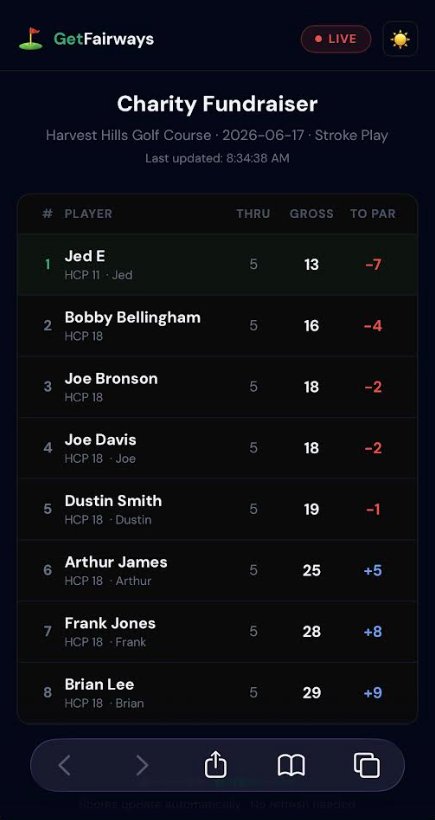
That's what we built. Every tournament in GetFairways now has a public spectator board — a clean, mobile-first live leaderboard that anyone can view with a link. No login. No app. No permission needed.
What spectators see (and what they don't)
The spectator board shows the same live leaderboard data your scorers see in the app — players, handicaps, current gross scores, score to par, holes played, and the time of the last update. Scores stream in live, so nobody has to refresh.
What they don't see: your admin tools, anyone's personal contact info, edit controls, payment data, or anything they shouldn't. It's strictly read-only. They can watch the round; they can't touch it.
How to share the link
Every tournament has a short URL like getfairways.com/board/your-tournament-slug. Some natural places to share it:
- In the registration confirmation email — most golfers are checking their email around tee time anyway.
- In the player SMS reminder — GetFairways already sends a text before each round; the spectator link rides along and players forward it to family.
- In the league's group chat — pin it once, covers the whole season.
- In the Instagram bio or Facebook event — instant promotion for charity scrambles and member-guest events.
The URL is short enough to dictate over the phone. People who get it can bookmark it and check any tournament day going forward.
Three ways your spectators will actually use it
1. The "I couldn't make it" check-in
Someone is at work. Their team is at the course. They open the link on their phone between meetings, see their team is even par with five holes to play, breathe easier, get back to it. No texts to teammates, no waiting for someone to post a photo of the scorecard.
2. The family share
Mom is at her kid's junior tournament. Dad is at home with the other kids. She sends him the spectator link in a text. He sees their kid is leading by two, sends back fire emojis. Grandparents get the same link. No more "how's it going?" updates every twenty minutes.
3. The clubhouse TV
This one is underrated. Open the spectator board in any browser, plug a laptop into the clubhouse TV with an HDMI cable, and full-screen the page. Now everyone in the clubhouse sees the live leaderboard. Smart TVs work too if they have a built-in browser — same setup, no cable. Members come off the course, walk in, see their name on the big screen, and it becomes a conversation. That's a real difference from a printed leaderboard pinned to a corkboard.
The dark theme reads well on big screens, and the layout works at full TV resolution. If you want a brighter look, there's a light/dark toggle in the corner.
What it costs
Nothing extra. The spectator board is included in every GetFairways tournament — free trial, $99 single tournament pass, and the $599/year annual plan. If you can create a tournament, you have a spectator board for it automatically. Just share the link.
How to try it
Already running a tournament in GetFairways? Open it in the admin view, find the share options, and copy the spectator board URL. Send it to two or three people and watch the texts come back asking how the leader is already 7 under.
Not a customer yet? Start a free 7-day trial below, run a tournament tonight, and share the spectator board with whoever asks how it's going.
Run a tournament with a spectator board this week
Free 7-day trial. No credit card required to start.
Start your free trial →